
On the 15th of May 2026, Oracle finally released the possibility to set individual percentage allocations for the ASM Diskgroups +DATACn, +RECOCn and optionally +SPRCn. This feature can be used for new and existing VM Clusters. In this blog post, I will demonstrate how to use the new feature.
Table of Contents
Update
31.05.2026: Oracle confirmed that the restart of the Clusterware is not intended and marked this behavior as bug. The fix for this bug will be released with the new next dbaastools version 26.2.2.
The following background details were provided by Oracle Development.
During SPARSE diskgroup add/drop, we need to update the asm_diskstring for the disk search/update. To take effect of the new string, we need to restart the CRS of the local node so that the new disks under ‘o/*/SPRC19_*’ will be visible at ASM instance level and the diskgroup can be created out of it.
History
In the past, Oracle allowed the following percentage allocations based on the selected options during the provisioning of a new VM Cluster. Changing the percentage allocations after the provisioning was not possible.
| Option | +DATACn | +RECOCn | +SPRCn |
|---|---|---|---|
| – | 80 % | 20 % | 0 % |
| Sparse Snapshots | 60 % | 20 % | 20 % |
| Local Backups | 40 % | 60 % | 0 % |
| Sparse Snapshots & Local Backups | 35 % | 50 % | 15 % |
Scale VM Resources
To change the percentage allocations or you activated additional features, like for example the +SPARSECn ASM Diskgroup, navigate to the overview of the VM Cluster in the OCI Console and click on the button Scale VM Resources in the top right corner.
In the area you are now able to select between the options Allocate Oracle chosen default storage sizes and Allocate custom storage sizes. The first allows the percentage allocations based on the known options.
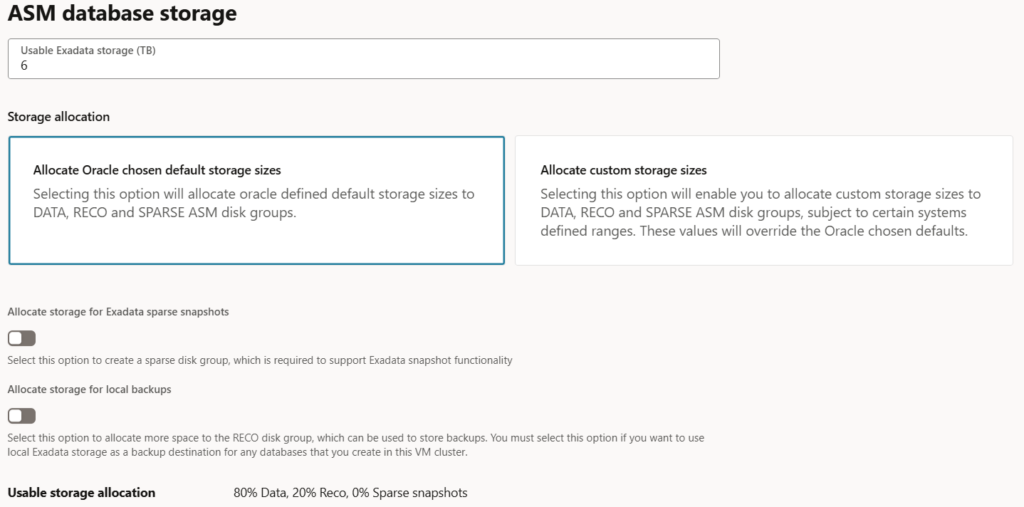
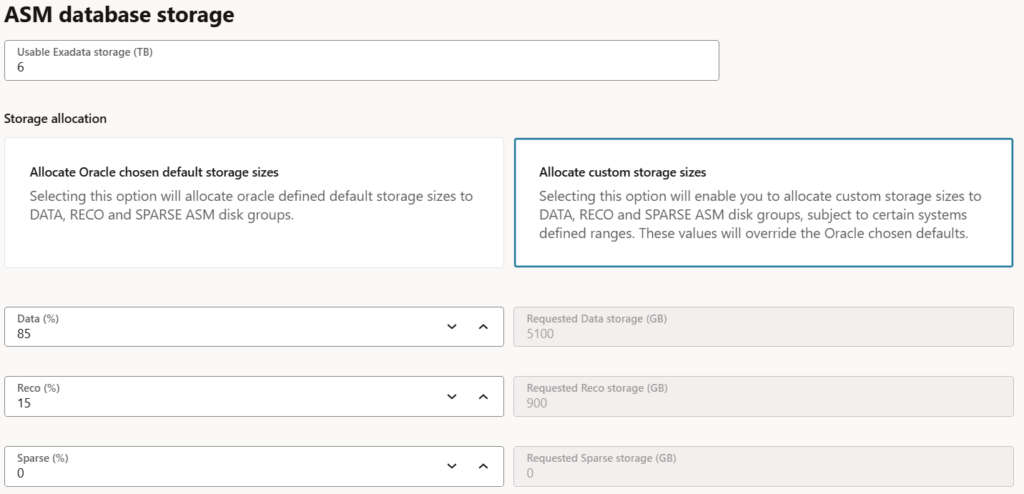
To use individual sizes, select the option Allocate custom storage sizes and set the percentage allocations as you want. The mimimal percentage is 10% for +DATACn and +RECOCn. As +SPRCn is not mandatory, it can be set to 0.
It is also possible to remove an existing +SPRCn ASM Diskgroup by setting it back to 0. Oracle is using internally the following command to drop it.
SQL> DROP DISKGROUP SPRCn FORCE INCLUDING CONTENTS;
CAUTION: When the +SPRCn ASM Diskgroup is created or dropped, the Clusterware stack on the first node is restarted. Due to Flex ASM, this should not impact the running database instances.
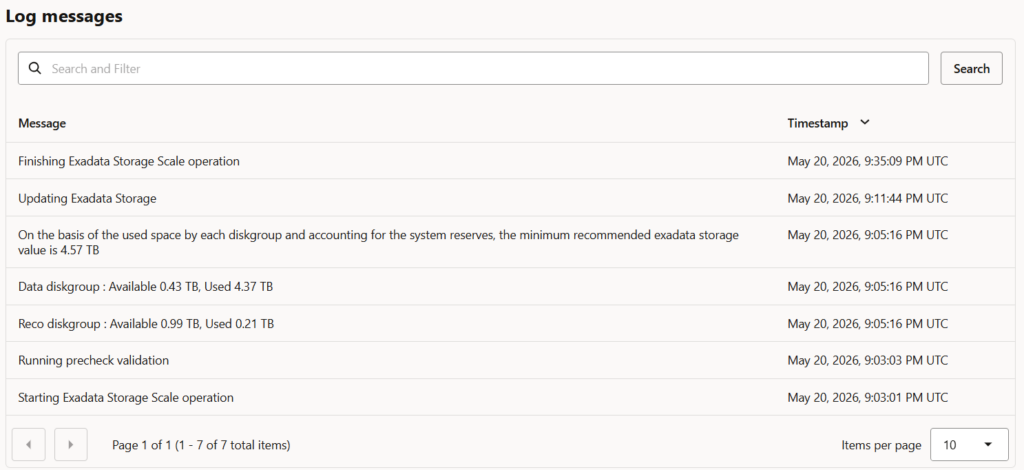
After the changes were confirmed, a Work Request for the update of the storage is started. The whole scale process is performed without a downtime.

Provisioning of a new VM Cluster
The same options as mentioned in the previous chapter are available during the provisioning of a new VM Cluster.
Clusterware Restart
If the ASM Diskgroup +SPRCn is created or dropped, a restart of the Clusterware on the first node is executed.
$> vi /u01/app/grid/diag/crs/node1/trace/alert.log
...
2026-05-21 14:19:32.060 [OHASD(16050)]  CRS-2791: Starting shutdown of Oracle High Availability Services-managed resources on 'node1'
2026-05-21 16:02:10.203 [OHASD(639)]    CRS-2791: Starting shutdown of Oracle High Availability Services-managed resources on 'node1'
The ASM alert log shows that after the +SPRCn ASM Diskgroup was dropped, a few momemts later, the ASM instance was stopped.
SUCCESS: diskgroup SPRC19 was dropped
2026-05-21T14:19:29.748267+02:00
SUCCESS: DROP DISKGROUP SPRC19 INCLUDING CONTENTS
2026-05-21T14:19:31.942315+02:00
ALTER SYSTEM SET asm_diskstring='o/*/DATAC19_*','o/*/RECOC19_*','/dev/exadata_quorum/*' SCOPE=SPFILE;
2026-05-21T14:19:34.670981+02:00
NOTE: ASM client cdb01p1:cdb01b18_r04:fra123456clu19 disconnected unexpectedly.
2026-05-21T14:19:34.670981+02:00
NOTE: ASM client cdb01p1:cdb01p_r04:fra123456clu19 disconnected unexpectedly.
NOTE: check client alert log.
NOTE: check client alert log.
2026-05-21T14:19:39.727436+02:00
NOTE: client +APX1:+APX:fra123456clu19 deregistered
2026-05-21T14:19:41.169084+02:00
ALTER SYSTEM RELOCATE CLIENT 'node1:_OCR'
2026-05-21T14:19:46.235377+02:00
NOTE: ASMB process exiting due to ASM instance shutdown (inactive for 1 seconds)
2026-05-21T14:19:46.238837+02:00
NOTE: client +ASM1:+ASM:fra123456clu19 deregistered
2026-05-21T14:19:46.238991+02:00
Shutting down ORACLE instance (immediate) (OS id: 399535)
Shutdown is initiated by oraagent.bin@node1 (TNS V1-V3).
Although Flex ASM is used, the database instances are also restarted. This might lead to issues with the application, if for example no connection pool or Application Continuity is used.
Troubleshooting
For the case that the Work Request fails, check the following log locations and files for further details.
/var/opt/oracle/log/precheck_asm_resize/precheck_asm_resize.log/u01/app/grid/diag/asm/+asm/+ASMn/trace/alert_+ASMn.log
Depending on the state, a Service Request needs to be open to continue the failed Work Request.
Summary
Using custom sizes for the ASM Diskgroups looks like a small change, but the impact can be huge. TBs of storage were wasted, especially in the +RECOCn ASM Diskgroup, when the database(s) allocated a huge amount of space, whereas the required space for recovery-related files (e.g. Archive Logs, Flashback Logs, etc.) was low.
The following output shows a real-world example where nearly 40 TB of space in the +RECOCn ASM Diskgroup was wasted because of the fixed percentage allocations.
Filesystem            Size [GB]  Used [GB] Avail [GB]       Use% Mounted on
DATAC2/                  161170     134678      26491      83.56% DATAC2/
RECOC2/                   40292       1240      39051       3.08% RECOC2/